Know what you own, what you still owe, and what you can actually spend.
Track your assets, loans and cash flow in one place. See how a decision you make today changes your finances.
- Overview
- Cash flow
- Assets
- Plan
What if you pay an extra $10,000 toward principal?
The Nov 25 instalment of $2,000.00 is paid as scheduled. Nothing extra is paid.
What does one loan instalment change?
Unlike the extra payment above, this is the regular monthly instalment. $2,000.00 leaves your account, but not all of it is a cost.
- 1Leaves the account
- 2Principal and interest
- 3Result
Nov 25: $2,000.00 = $1,200.00 principal + $800.00 interest.
Each part answers a question you already ask yourself.
Same person, same apartment and accounts as above. Each panel asks and answers one situation at a time. Pick a question to jump to it.
How much can I spend today?
Your account balances minus what you have set aside. The next loan payment is shown separately so you see it coming.
- Net worth
- Month-by-month change
- Things to look at
- Setup and month-end close
After upcoming payments, what is left?
Income, living costs and loan payments in date order, with the balance left after each step.
- Record income and spending
- Transfers between accounts
- History and reconciliation
- Emergency fund
- Scan a QR code
How much of this home is really mine?
The apartment's value split into your equity and the loan. Every principal payment makes your share bigger.
- Asset list
- Revaluation
- Repayment schedule
- Personal loans
- Deposits and maturity
Where could my finances be at the end of the year?
A net worth projection to Dec 31 under three apartment-price scenarios. Income, spending and the loan schedule stay the same.
- Add expected income and spending
- Long-term simulation
- Compare a decision
- Stress test
- Save scenarios
Every number can be checked against your bank.
Six rules apply to every number in the app, including the ones on this page.
Exact to the cent
Balances, instalments, principal and interest show every digit so you can match them with your statement. Short forms are used only when they equal the real amount.
Nothing counted twice
A transfer between your own accounts is neither income nor spending. Paying principal lowers both cash and debt, so net worth only drops by the interest.
Original currency kept
Foreign-currency accounts always keep their original amount. Conversion to your reporting currency is for reports only, with the rate and its date, and never overwrites the original.
Actuals and projections kept apart
What happened, what is estimated and what is projected carry their own labels. Every projection has “See how it’s calculated”.
Closed months stay closed
A closed month keeps its numbers, rates and method. If you edit an old transaction, you reopen the month and close a new version.
Nothing disappears
A cancelled transaction stays in your history. A refund is recorded as an opposite entry.
Where do your balances and debts go?
The points below hold for the first release of Quiet Wealth.
Quiet Wealth does
- Keep your data in your account’s own workspaceOne workspace per account; there are no shared accounts.
- Let you sign in with Apple, Google or an email link
- Let you delete your account in the appIt tells you what will be deleted before you confirm.
- Record every change to your moneyYou can always look back at the history.
Quiet Wealth does not
- Ask for your bank password or OTPThe first release does not connect to banks.
- Move money or pay on your behalfThe app only records; payments happen in your bank.
- Let anyone else see your data
- Sell your data or use it for advertising
Where data is stored, how long it is kept and who processes it are set out in the Privacy Policy.
Start with one asset and what you still owe on it.
No need to enter your whole history. Two numbers are enough to see your share.
Sample numbers; you can change them. Add the schedule, accounts and cash flow later.
Add your accounts to see net worth, and the loan schedule to see your next payment.
Frequently asked questions
Who can see my data?
Each Quiet Wealth account is its own workspace and is not shared with anyone. You sign in with Apple, Google or an email link, and you can delete your account in the app. Where data is stored and how long it is kept are set out in the Privacy Policy.
Does it connect to my bank?
Not yet. The first release does not connect to banks. You enter balances, transactions and loans yourself, then reconcile with your bank balance when you need to.
Phone or computer?
Quiet Wealth is an app for iPhone and Android. A web version is planned.
Can I use other currencies?
Yes. You choose a reporting currency; accounts and assets in other currencies keep their original amounts. The app is available in English and Vietnamese.
How much does Quiet Wealth cost?
Pricing will be announced at launch.
Are projections investment advice?
No. Projections are calculated from the numbers and assumptions you enter. They are not a promise or investment advice, and you can always see how they are calculated.
Good to know
- Not investment advice or personal financial advice. Projections follow the assumptions you enter.
- You enter the numbers. The first release does not pull balances from banks.
- No tax calculations, and not a replacement for accounting records.
- Numbers on this page are samples, not real users’ data.
Start with the home and the loan you already have.
One set of numbers for assets, debt, cash flow and plans.
Sign up with Google or an email link on the web.
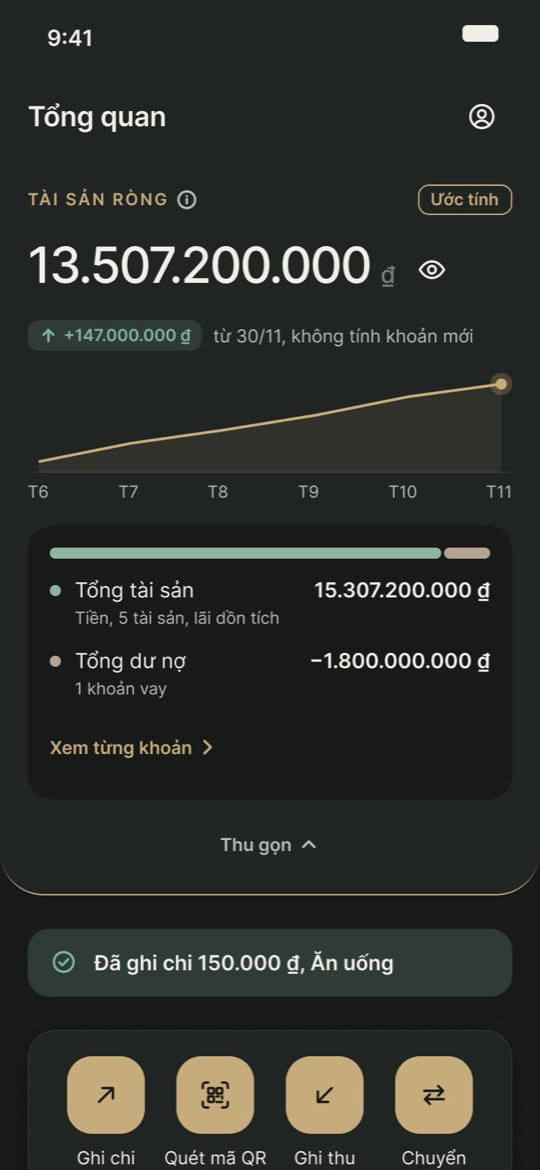
- Expense
- Scan QR
- Income
- Transfer